

Agreement and
Instructions
Customer documentation: Public Offer, Appendices, forms of agreements and contracts, step‑by‑step instructions on ordering the service, adding, registering and renewing domains.
Service Administration of Domain Names
Service administration of domains is a contractual arrangement under which you remain the domain owner, and we act as your professional administrator.
Under this service, we become the service administrator of your domain and take on all technical responsibilities: renewal, interaction with registrars, changing NS records upon your request.
You remain the owner of the domain, website and content under the agreement. This is a legal and reliable way to delegate the technical side to professionals while keeping full control over your domain.
Who needs this service and why- Companies that want to hand over technical matters to professionals and focus on their business.
- Any domain owners who value reliability, professional support and protection against domain loss due to missed deadlines or technical errors.
- Foreign companies and individuals who have domains in .RU, .РФ, .SU zones and for whom the requirements of Russian legislation create additional barriers.
The new requirement for mandatory identification of domain administrators in .RU, .РФ, and .SU zones through the State Services (ESIA) portal puts foreign domain owners in a difficult position: without a Russian legal entity or representative office, they cannot independently meet these requirements.
The Service Administration service we offer is ideally suited for foreign domain owners in .RU, .РФ, .SU zones.
Foreign companies and individuals retain the ability to maintain a presence in the Russian domain space.
In foreign jurisdictions, services such as Trustee Service, Local Presence Service, or Domain Proxy Service are widely used; they are often formal or nominal in nature. We, however, offer genuine legal and technical domain support under a service administration agreement. By entering into an agreement with us, you get not a nominal administrator, but a professional partner who assumes all technical obligations and guarantees the preservation of your rights to the domain.
If you do not resolve the administration issue:- You may miss renewal deadlines and lose your domain.
- Technical issues (NS, interaction with registrars) take time and require expertise.
- For non‑residents, additional difficulties arise with meeting identification requirements.
We offer a simple and reliable solution – professional service administration..
How service administration works- Conclude an agreement – remotely. It is sufficient to accept the terms of the public offer (acceptance). If you need a bilateral signed agreement – instructions are on the website.
- You transfer your domain name from your current registrar to us.
- Make an advance payment for the first year of service (currently 50% discount applies).
- Provide documents for identification:
- Individuals: a copy of your passport or other identity document.
- Legal entities: a copy of the document confirming state registration, and a copy of the document confirming the signatory’s authority.
* Documents in a foreign language must be accompanied by a translation into Russian. In individual cases, we may also request documents with an apostille and/or notarisation.
- We go through all necessary procedures and become your service administrator in the registry.
- Upon your request, we change NS records, interact with registrars, and handle all technical issues.
- We monitor registration periods and renew your domain annually, sending a reminder 2 months in advance and a report upon request.
Your rights and our guarantees
- ✅ You are the domain owner. The Agreement expressly secures your rights to the domain, website and content.
- ✅ We are the technical administrator of the domain. When the domain is transferred to us, we acquire no rights of ownership, management or disposal of your domain; we cannot sell or transfer it to any third party.
- ✅ You may at any time request the transfer of administration rights to yourself or to a third party – the procedure is set out in the Agreement.
- ✅ Hosting and the website remain fully under your control. We do not touch the content of the website, we do not edit or post content.
What you get after concluding the agreement
- A service administrator – we assume all technical obligations.
- Domain renewal – without delays or risk of loss.
- NS record management upon your request.
- Interaction with registrars – we handle all matters.
- Annual renewal reminder 2 months in advance.
- Transparency and control – a personal account with domain status and transaction history.
How to order the service administration service
- Register in your personal account on our website.
- Add the domain(s) to administration.
- Pay for the first year of service.
- Accept the terms of the public offer – this is sufficient to conclude the agreement. If you need a bilateral signed agreement, follow the instructions in the Documentation section.
- Transfer the domain to us from your current registrar.
- After the transfer, we take over all technical matters.
For any questions, please write to: support@altnames.ru
Instructions for ordering the "Service Administration" service.
Step 1. Register on the website
Provide: contact person, email, password, country.
Please provide: contact person, email, password, and country.
Step 2. In your personal account, fill out the payer information form
Individuals full name, citizenship, passport details (identity document details), address, phone number.
Legal entities: full company name, country of registration, registration number, legal address, phone number, email
How to fill out the form: Fill out the form in the language of your official documents (Russian, English, Chinese, Belarusian, Ukrainian, etc.). Our objective is not to transfer data to international registries, but to correctly identify you as a party to the agreement.
Important: The data in the application form must exactly match the information provided in your documents (passport, certificate of incorporation). Copies of these documents and their translation will be provided to us later.
Step 3. Ordering the service and adding a domain
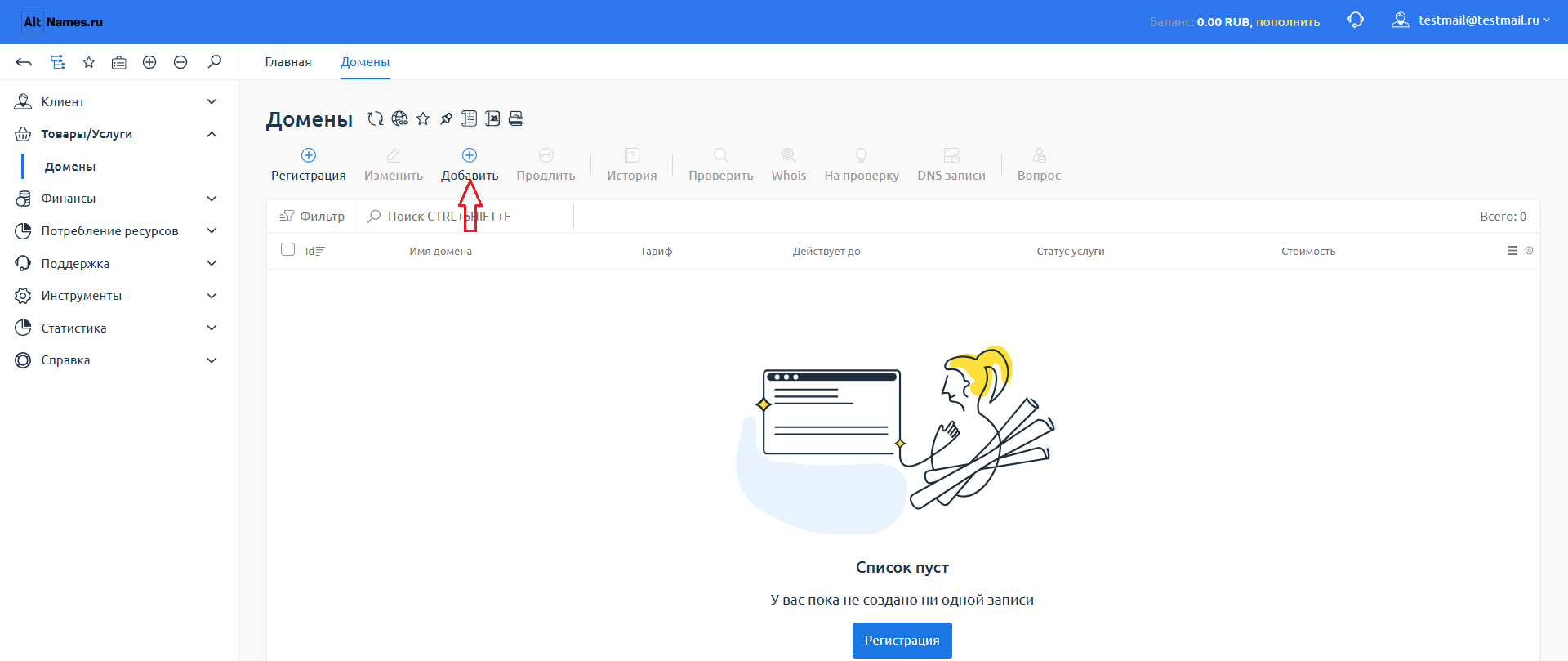
Go to the "Domains" section → click "Add" → enter the domain.
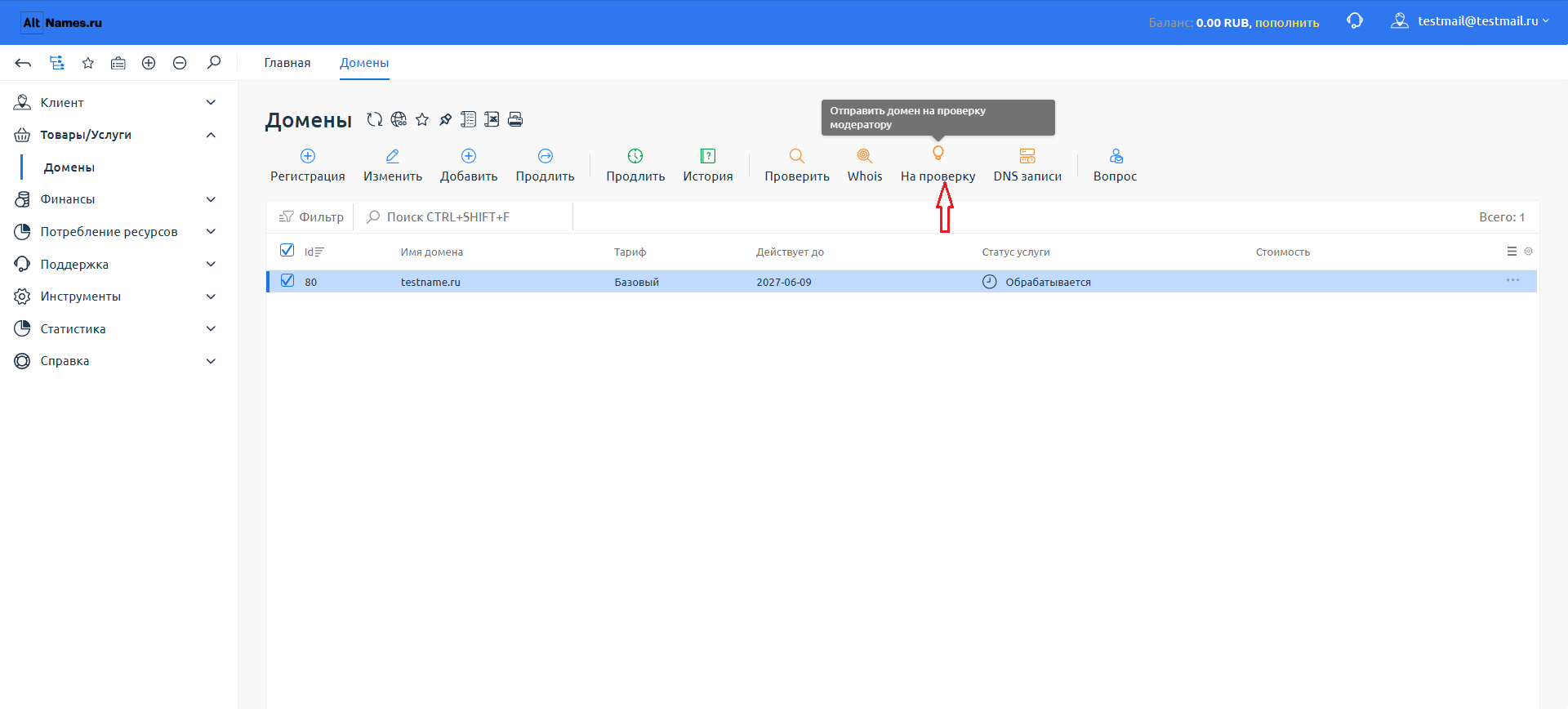
Step 4. Click the "Submit for Review" button
We will check the domain status, its availability for transfer, and whether we can accept it for administration. We will respond to your request as soon as possible.
Step 5. You will receive a confirmation email
The letter will include: confirmation of our readiness to provide the service administration service, and our details (Alternativa LLC) for changing the administrator with your current registrar.
Step 6. Pay for the first year (period) of management
In your personal account (section "Finances" → "Payments").
Step 7. Transfer the domain name to us
Подайте вашему регистратору заявление на смену администратора. Большинство регистраторов требуют от физических лиц нотариальное заверение подписи в заявлении. Юридическим лицам как правило такое заверение не требуется, достаточно печати и подписи руководителя.
Tip: If you need to visit a notary, it is best to have the translation of your documents into Russian certified and also have the application itself notarised (if the registrar requires it) – all in one visit.
Individuals: have the translation of your passport (or other identity document) notarized.
Legal entities: have the translation of the document confirming state registration (extract from the commercial register, certificate of incorporation, etc.) and the document confirming the authority of the signatory (director or authorized representative) notarized.
Step 8. Provide scanned copies of documents
- Individuals: – a copy of the passport (or other identity document).
- Stateless persons: – a copy of the identity document (residence permit).
- Legal entities: – a copy of the document confirming state registration (registration certificate, extract from the commercial register), and a copy of the document confirming the authority of the signatory (director or representative under a power of attorney).
Documents in a foreign language must be provided with a translation into Russian. Additionally, in certain individual cases, we may request documents with an apostille and/or notarisation.
You can upload scanned copies of documents in your personal account (in the "Documents" section) or send them to support@altnames.ru. support@altnames.ru.
Our services are provided on the basis of the Public Offer (Agreement for Service Administration of a Domain Name).To start cooperation, it is sufficient to accept its terms (acceptance) — the agreement is deemed concluded upon registration, ordering the service by adding a domain and payment. The term of the agreement corresponds to the domain registration period (no more than 1 year) and is automatically renewed upon payment for the next service period.
- Public Offer
- Appendix No. 1 “Prices for Service Administration Services”
- Appendix No. 2 “Consent to Personal Data Processing”
- Policy of personal data processing
- Agreement Forms: for legal entities, for individuals
- Agreement on Limitation of Liability
- Forms of the Agreement on Limitation of Liability: for legal entities, for individuals
- Partner Agreement
- Partner Agreement Form
Conclusion of the Domain Service Administration Agreement
Our services are provided on the basis of the a Public Offer.To start cooperation, it is sufficient to accept its terms (acceptance) – the agreement is deemed concluded upon registration, ordering the service by adding a domain, and making payment. Acceptance of the offer constitutes full agreement with its terms, as well as the Rules and instructions published on the website.
However, if you require a document signed by both parties, you can arrange it in one of two ways.
▶ Method 1. Through the control panel (billing)
- Fill out the form in your personal account, in the "Profile" section.
- The system will automatically generate an agreement based on your data.
- Then two signing options are available:
- Electronically – a signing link will be sent to your email (simple electronic signature).
- In hard copy – print the agreement, sign it, affix a seal (for legal entities), and upload a scan/photo in the "Agreements" section.
▶ Method 2. Self-preparation
Download the agreement form, fill it out, sign it, affix a seal (for legal entities), and send it to us at: support@altnames.ruWe will review the document, sign it on our side, and send you the executed copy. The agreement is drawn up in both Russian and English.
📌 Provision of services takes place after:
- acceptance of the public offer or signing of a bilateral agreement
- replenishment of the balance (receipt of payment for services);
- transfer of the domain name to us (confirmed by the registry record)
After concluding the agreement
- ✔️ We become your service administrator for your domains.
- ✔️ We renew your domain registration and keep everything under control.
- ✔️ Upon your request, we change NS records, interact with registrars, and handle all technical matters.
- ✔️ You, just as before, manage the domain and website independently, upload content, and adjust any necessary settings.
- ✔️ Hosting remains exclusively on your side.
- ✔️ You will receive notifications and reminders from us about the next payment 2 months before your domain registration expires.
📄 Guidelines for completing the agreement for companies and individuals
Thank you for choosing our service. To ensure that the agreement process goes as quickly and smoothly as possible, please carefully review the guidelines below. The agreement is drawn up in both Russian and English – you can compare the two versions.
✅ General rules for all clients
- Use the language of your official documents (Russian, English, Chinese, Belarusian, Ukrainian, etc.). Our objective is not to transfer data to international registries, but to correctly identify you as a party to the agreement. Most importantly: the information in the agreement must exactly match the information that will appear in the notarized translation of your documents (passport, certificate of incorporation, extract from the commercial register). You will provide this translation to us later, in accordance with the terms of the agreement.
- Be accurate and consistent. Provide the same details identically in all documents and in your personal account. For example, if you wrote "John Smith" in the form, the same spelling must be used in the agreement, payment orders, and correspondence.
- Sign the agreement. You can sign the agreement with an electronic signature (via Kontur.Diadoc) or download the PDF, print it, affix a "wet" signature, scan it, and upload it to your personal account. Both methods have legal force.
👤 For individuals
- Fill in your details in the "Customer" section
- Full name (last name, first name, patronymic if any) – exactly as in your passport. Example: Ivanov Ivan Ivanovich
Ivanov Ivan Ivanovich - Passport details (identity document) – series, number, issued by, and date of issue.
- Residential address – country, postal code, city, street, house number, apartment number.
- Contact phone number and email – active details for communication.
- Tax identification number (if any) – if you have a taxpayer identification number in your country or in Russia, please provide it.
- Full name (last name, first name, patronymic if any) – exactly as in your passport. Example: Ivanov Ivan Ivanovich
- Sign the agreement
- If you use an electronic signature – you will receive a signing link. Follow the link and confirm the action (via SMS code, app, or simple password-based signature).
- If you use a paper scan – print the agreement, sign it, date it, scan it in clear quality (PDF), and upload it to your personal account in the order section.
- Pay for the service – top up your balance in your personal account. Make the payment according to the selected plan.
🏢 For legal entities (companies)
- Fill in the company details
- Full name of the organization – strictly as per the founding documents and the commercial register. For example:
Smith Trading Limited - Country of registration and registration number of the organization (OGRN or its equivalent).
- Legal address – full registered office address according to the register.
- Bank details – bank name, BIC, correspondent account, and settlement account (IBAN, SWIFT/BIC).
- Contact email and phone number – for prompt communication.
- Details of the authorised representative – position (e.g., General Director, Gérant, CEO), full name, and document confirming authority (e.g., resolution, order, articles of association, or power of attorney).
- Full name of the organization – strictly as per the founding documents and the commercial register. For example:
- Sign the agreement
- Electronic signature – the most convenient method. The company's manager signs the agreement via Kontur.Diadoc (non-resident electronic signatures are supported).
- Scan with a wet signature – print the agreement, sign it, affix the company seal (if any), scan it, and upload it.
- Pay for the service – top up your balance in your personal account. Make the payment according to the selected plan.
If you have any questions, please write to us at support@altnames.ru or create a support request in your personal account. We will help you fill out the agreement correctly.
In Russia, there is a unified identification system for legal entities (INN/OGRN). Foreign companies do not have direct equivalents, but they do have mandatory identifiers.
Table of identifiers by country:
| Country | Identifier | Description | Example |
|---|---|---|---|
| Germany | Handelsregisternummer | Commercial register number (Local court + HRB/HR) | Amtsgericht München HRB 123456 |
| Germany | Steuernummer | Tax number (for tax authorities) | 123/456/78901 |
| China | 统一社会信用代码 (USCC) | Unified code — analogous to a combination of the Primary State Registration Number and Tax Identification Number, 18 digits | 9111010178098592XA |
| Europe (general) | Company Registration Number | National trade registry number | Depends on the country |
| Europe (general) | VAT Number | VAT number | DE123456789 |
| United Kingdom | Company Number | Companies House number | 01234567 |
| USA | EIN | Employer Identification Number (federal tax number) | 12-3456789 |
| Беларусь | УНП | Учётный номер плательщика (аналог ИНН) | УНП 123456789 |
| Казахстан | БИН | Бизнес-идентификационный номер (для юрлиц) | БИН 123456789012 |
| Казахстан | ИИН | Индивидуальный идентификационный номер (для ИП и физлиц) | ИИН 123456789012 |
| Украина | Код ЄДРПОУ | Единый государственный реестр предприятий и организаций Украины | Код ЄДРПОУ 12345678 |
| Узбекистан | ИНН | Идентификационный номер налогоплательщика (9 цифр) | ИНН 123456789 |
| Киргизия | ИНН | 14-значный идентификационный номер налогоплательщика | ИНН 12345678901234 |
📋 Examples of filling out the 'Party Details' section
Below are examples of filling out the 'Party Details' section (or 'Details of the Parties' in the English version) for foreign parties to the agreement. Use them as a template for your company.
| Country | Agreement Section (Example of Completion) | Explanation for the client |
|---|---|---|
| 🌍 CIS (Belarus, Kazakhstan) |
Юридический адрес: 220035, Республика Беларусь, г. Минск, ул. Тимирязева, д. 65А, оф. 1
|
Use the standard details specified in your constituent documents. For Kazakhstan, use BIN instead of UNP; for Russia, use INN/KPP. |
| 🇪🇺 European Union (Germany, France, Italy, etc.) |
Legal address / Juristische Adresse: Musterstraße 123, 10115 Berlin, Germany
|
Be sure to provide the registration number from the commercial register (e.g., Handelsregisternummer in Germany, SIREN in France) and the VAT number. Provide your banking details in the international IBAN and SWIFT/BIC format. |
| 🇬🇧 United Kingdom |
Legal address: 221B Baker Street, London, NW1 6XE, United Kingdom
|
For companies registered in England and Wales, the Registration Number consists of 8 digits. For Scottish companies, it begins with 'SC' followed by 6 digits. Provide the Sort Code and Account Number in addition to the international IBAN and SWIFT. |
| 🇨🇳 China |
Legal address / 法定地址: No. 123, Nanjing Road (E), Huangpu District, Shanghai, 200000, China
|
Since 2024, the key identifier is the 18-digit Unified Social Credit Code (USCC). Provide the exact company name in Chinese and in Latin script. Provide banking details with the SWIFT code. |
| 🇺🇸 USA |
Legal address: 350 5th Ave, New York, NY 10118, United States
|
Provide the exact legal name of the company. The EIN (Employer Identification Number) is a federal 9-digit number. Instead of IBAN, the US uses an account number and a Routing Number. |
| 🇦🇪 UAE (Dubai) |
Legal address: Office 101, Building 1, Dubai Internet City, Dubai, UAE
|
Provide the exact legal name of the company and the registration number issued by the free economic zone (e.g., DMCC, DIFC, ADGM). Provide your bank's IBAN and SWIFT. |
| 🇹🇷 Turkey |
Legal address / Yasal adres: Levent Mahallesi, Büyükdere Caddesi No:123, 34330 Beşiktaş/İstanbul, Turkey
|
For Turkish companies, be sure to provide the Mersis No (a unified registration number consisting of 10 digits) and the tax office (Vergi Dairesi). Provide your bank's IBAN and SWIFT. |
| 🌐 Offshore zones (Cyprus, BVI, Caymans) |
Registered Address / Reg. Adresi (Cyprus): 1, Lampousas Street, 1095 Nicosia, Cyprus
|
Provide the company registration number (for example, for Cyprus, the number begins with 'HE' followed by 6 digits). A VAT identification number or its equivalent may not exist. Provide your banking details in the international IBAN and SWIFT/BIC format. |
✍️ Analogous examples
Germany (GmbH):
- Full name: XYZ GmbH
- Country of registration: Federal Republic of Germany (OKSM code: 276)
- Commercial register number: Amtsgericht Köln HRB 98765
- Tax number (Steuernummer): 123/4567/8901
- VAT number (USt-IdNr.): DE123456789
- Legal address: Musterstraße 1, 50667 Köln, Germany
- Banking details: IBAN DE12 3456 7890 1234 5678 90, SWIFT COBADEFFXXX, Commerzbank AG
- Notification email: info@xyz-gmbh.de
China (Ltd.):
- Full name: Beijing Tech Co., Ltd. / 北京科技有限公司
- Country of registration: People's Republic of China (OKSM code: 156)
- Unified Social Credit Code: 91110105798936254F
- Business license number (if available): 110105012345678
- Legal address: No. 28, Zhongguancun Street, Haidian District, Beijing, China
- Banking details: SWIFT BKCHCNBJ, Bank of China, Beijing Branch, Account No. 123456789012
- Notification email: contact@beijingtech.cn
USA (LLC):
- Full name: ABC Solutions LLC
- Country of registration: United States of America (State of Delaware)
- State registration number (File Number): 1234567
- Federal tax number (EIN): 12-3456789
- Legal address: 123 Main Street, Suite 100, Wilmington, DE 19801, USA
- Banking details: Account No. 12345678, Routing No. 021000021, Chase Bank, NA, SWIFT CHASUS33
- Notification email: info@abcsolutions.com
If a company refuses to provide any of the above-mentioned data (e.g., tax number), that is a reason for concern. For trust management of domain names, accurate client identification is critically important, as we become the nominal administrator and potentially bear risks. If you still have questions about a specific country or type of company, please ask us.
This page contains official registrar instructions for changing the domain administrator (owner). Select your registrar and follow the step‑by‑step guide.
This procedure is called differently by registrars: “Change of administrator”, “Transfer of administration rights” or “Domain transfer”.
General rules for domain name transfer:
- To transfer domain name rights to another Administrator, the current Administrator must submit a corresponding application.
- Application forms for individuals and legal entities are available on registrars’ websites.
- Most registrars require a notarised application.
- The person receiving the administration rights must conclude an agreement with the registrar for the provision of domain name registration services and also confirm their consent to accept the domain.
Please note: Transfer of administration rights for domain names in the .RU and .РФ zones is impossible in the following cases:
- if less than 30 days have passed since the last change of administrator;
- if the domain registration period has expired;
- if the domain name coincides with a designation included in the stop‑list;
- if pre‑judicial or judicial restrictions have been imposed;
- if the registrar’s request for information and documents is not fulfilled within the established period.
Instructions for major registrars:
- Reg.ru – procedure “Change of domain administrator”. Instruction. For non‑residents of the Russian Federation, a notarised application with a Russian translation is required.
- NIC.RU (RU-CENTER) – “Transfer of domain rights” / “Change of administrator”. Instruction. For non‑residents, a notarised application is required.
- Webnames.ru – change of administrator based on a written application. Contact Webnames support for the application form.
- Timeweb.name – includes verification of both parties and domain acceptance using a secret key. Instruction.
- Domeny.ru – “Change of Domain Administrator”. Instruction.
- Active.domains – “Transfer of administration rights in .RU, .РФ”. Instruction.
If your registrar is not on the list:
- Log in to your registrar’s control panel.
- Look for sections: “Domains”, “Transfer of rights”, “Change of owner”, “Domain transfer”, “Change of administrator”.
- Contact support with the question: “How do I submit an application to change the administrator of the domain to another legal entity?”
- After concluding the agreement, we will provide you with all the necessary data to fill out applications with your registrar.
If you need help, write to us at support@altnames.ru.
Регистрация доменов .RU и .РФ с сервисным администрированием
Планируете выйти на российский рынок или хотите защитить свой бренд в национальных доменах России? Мы предлагаем услугу регистрации доменного имени с последующим профессиональным сервисным администрированием.
What is the difficulty for foreigners?
С 1 сентября 2026 года администратором домена в зонах .RU и .РФ может быть только лицо, прошедшее идентификацию через ЕСИА (Госуслуги). Иностранные граждане и компании без российского юридического лица не могут самостоятельно пройти эту процедуру — а значит, не могут зарегистрировать или продлить домен в этих зонах.
Для российских компаний услуга также актуальна: вы передаёте технические вопросы профессионалам и сосредотачиваетесь на своём бизнесе.
Наше решение: регистрируем по вашему заданию и администрируем для вас
- You choose a domain. Check its availability and leave a request on our website.
- Мы заключаем договор регистрации и сервисного администрирования. Вы подписываете с нами Договор (на русском и вашем языке). В договоре чётко прописано, что вы — владелец домена.
- Мы регистрируем домен. Мы, как сервисный администратор производим техничекую регистрацию домена, наши данные вносятся в реестр доменных имен, но все имущественные права на домен принадлежат вам.
- Вы управляете, владеете и распоряжаетесь доменом. Мы администрируем домен, по вашей заявке мы изменяем NS-записи, взаимодействуем с регистраторами и решаем все технические вопросы.
What you get:
- Legal compliance. Your domain is registered in compliance with all requirements of Russian legislation.
- Гарантию ваших прав владельца. Домен — это ваше имущество. Договор сервисного администрирования защищает ваши права.
- Full control over the website. We do not interfere with your website content.
- Прозрачность и безопасность. В договоре прописан механизм передачи прав администрирования обратно вам по первому требованию.
- Поддержку. Уведомляем, напоминием и консультируем.
Frequently asked questions:
- If the domain is registered in your name, won’t you take it away? Нет. Это противоречит Договору сервисного администрирования, по которому мы обязаны действовать исключительно в ваших интересах и не имеем права распоряжаться доменом.
- Могу ли я продать домен? Да. Вы как владелец имеете право распоряжаться доменом. Мы поможем юридически грамотно оформить его передачу.
Услуга сервисного администрирования по каждому домену действует до окончания срока его регистрации. Для продления срока оказания услуги в отношении конкретного заказанного домена на следующий период необходимо произвести оплату.
Способы продления услуги:
- Вручную — в Личном кабинете: раздел «Доменные имена» → выбрать домен → «Продлить услугу». Оплата производится не позднее чем за 10 календарных дней до окончания текущего срока регистрации домена.
- Автопродление — услуга по домену продлевается автоматически при поступлении оплаты на счёт. Настраивается в свойствах домена в Личном кабинете.
Стоимость продления:
- Стоимость Услуги сервисного администрирования указана в Личном кабинете и определяется в соответствии с Договором. Стоимость может отличаться от тарифов, указанных в Приложении № 1, если проходят акции или применяются индивидуальные партнёрские цены.
- Стоимость продления домена не входит в стоимость Услуги администрирования, но может оплачиваться вместе. Стоимость продления домена определяется суммой, взимаемой Регистратором.
- Пользователь вправе самостоятельно продлить регистрацию домена у Регистратора, но обязан уведомить Исполнителя о произведённом продлении не позднее чем за 10 календарных дней до окончания срока регистрации. Если уведомление не получено, Исполнитель вправе продлить регистрацию за свой счёт с последующим выставлением требования о компенсации затрат.
Что происходит при истечении срока регистрации домена:
- День 0: срок регистрации истекает, Услуга сервисного администрирования в отношении этого домена прекращается. Договор при этом продолжает действовать для других доменов.
- Дни 1–30: период преимущественного продления — домен можно продлить у Регистратора по обычной цене, а Услугу — восстановить при условии оплаты и компенсации затрат на продление.
- После 30 дней: домен освобождается и становится доступен для свободной регистрации.
Рекомендации:
- Всегда держите положительный баланс на счёте для автопродления, чтобы избежать перерыва в оказании Услуги.
- Убедитесь, что email для уведомлений актуален — напоминания о необходимости продления отправляются заранее.
- Для критически важных доменов рекомендуем включить автопродление в Личном кабинете.
- Если Вы планируете самостоятельно продлевать домен у Регистратора, обязательно уведомите нас не позднее чем за 10 дней до окончания срока, чтобы мы могли скорректировать график оказания Услуги и избежать двойного продления.
Аннулирование и удаление доменных имён
Досрочное аннулирование (по заявлению владельца)
Если вам необходимо удалить домен до окончания срока регистрации, вы направляете нам письменное заявление через личный кабинет или по электронной почте. Мы, как сервисный администратор, передаём заявление регистратору. Процедура занимает до 3 рабочих дней с момента получения нами вашего заявления.
Аннулирование невозможно в следующих случаях:
- if the domain registration period has expired;
- если на домен наложены судебные или иные ограничения;
- в течение 30 дней после передачи домена на сервисное администрирование или смены регистратора.
Удаление домена по истечении срока регистрации
Срок регистрации доменов .RU и .РФ составляет один календарный год. По окончании этого срока регистрацию необходимо продлить.
Период преимущественного продления
После окончания срока регистрации у вас есть ещё 30 дней (период преимущественного продления), в течение которых вы можете продлить домен без потери прав. Мы напоминаем об этом заранее и помогаем продлить регистрацию.
Что произойдёт, если не продлить домен
- Сразу после окончания срока регистрации домен перестаёт делегироваться — сайт становится недоступен.
- В течение 30 дней преимущественного продления домен ещё можно восстановить.
- По истечении 30 дней домен освобождается (аннулируется) и может быть зарегистрирован любым другим лицом.
Дату освобождения домена можно отследить в сервисе Whois в поле «free-date».
Important: При досрочном аннулировании регистрации плата за услуги администрирования не возвращается, так как услуга считается оказанной с момента внесения записи о вас как об администраторе в реестр.
Мы контролируем сроки — заранее уведомляем вас о необходимости продления, чтобы вы не потеряли домен.
Domain Owner Contact and Identification Information
Зачем нужна идентификация
Для заключения договора сервисного администрирования и оказания услуг мы должны идентифицировать сторону по договору. Также мы обязаны иметь актуальные контактные данные для своевременного информирования вас о статусе домена, сроках продления и других важных событиях.
Что нужно предоставить
В течение 10 календарных дней с даты заключения договора (акцепта оферты) вы направляете нам:
- Для физических лиц: копию паспорта или иного документа, удостоверяющего личность.
- Для юридических лиц: копию документа о регистрации юридического лица и документ, подтверждающий полномочия подписанта (руководителя или представителя по доверенности).
Документы на иностранном языке предоставляются с переводом на русский язык. Нотариально заверенный перевод может быть запрошен в индивидуальных случаях.
Что будет, если не предоставить документы
Без документов мы не сможем заключить договор и приступить к оказанию услуг. Домен не будет принят в администрирование (или будет приостановлено делегирование, если домен уже передан). Внесённая предоплата подлежит возврату за вычетом фактически понесённых расходов.
Актуальность контактных данных
Корректные и актуальные контактные данные необходимы для:
- направления подтверждений, уведомлений о проверке домена, напоминаний о продлении, отчётов;
- связи с вами в экстренных случаях (например, при угрозе блокировки домена);
- отправки официальной корреспонденции при необходимости.
Обязанность уведомлять об изменениях
Вы обязаны незамедлительно сообщать нам об изменении своих контактных данных (email, телефон, юридический/почтовый адрес) через личный кабинет или по электронной почте support@altnames.ru. Если мы не получим актуальные данные, вы можете пропустить важные уведомления (например, о необходимости продления домена), что может привести к его потере.
Защита ваших данных
- Мы обрабатываем персональные данные строго в соответствии с Федеральным законом № 152‑ФЗ «О персональных данных».
- Доступ к вашим документам имеют только уполномоченные сотрудники, непосредственно работающие с договором.
- Мы не передаём ваши данные третьим лицам, за исключением случаев, прямо предусмотренных законом (по запросу правоохранительных или судебных органов) и договором.